Skills
A skill is a saved set of instructions for work you repeat. For example, create a skill to prepare a client update, review a particular type of clause, or turn correspondence into a chronology.
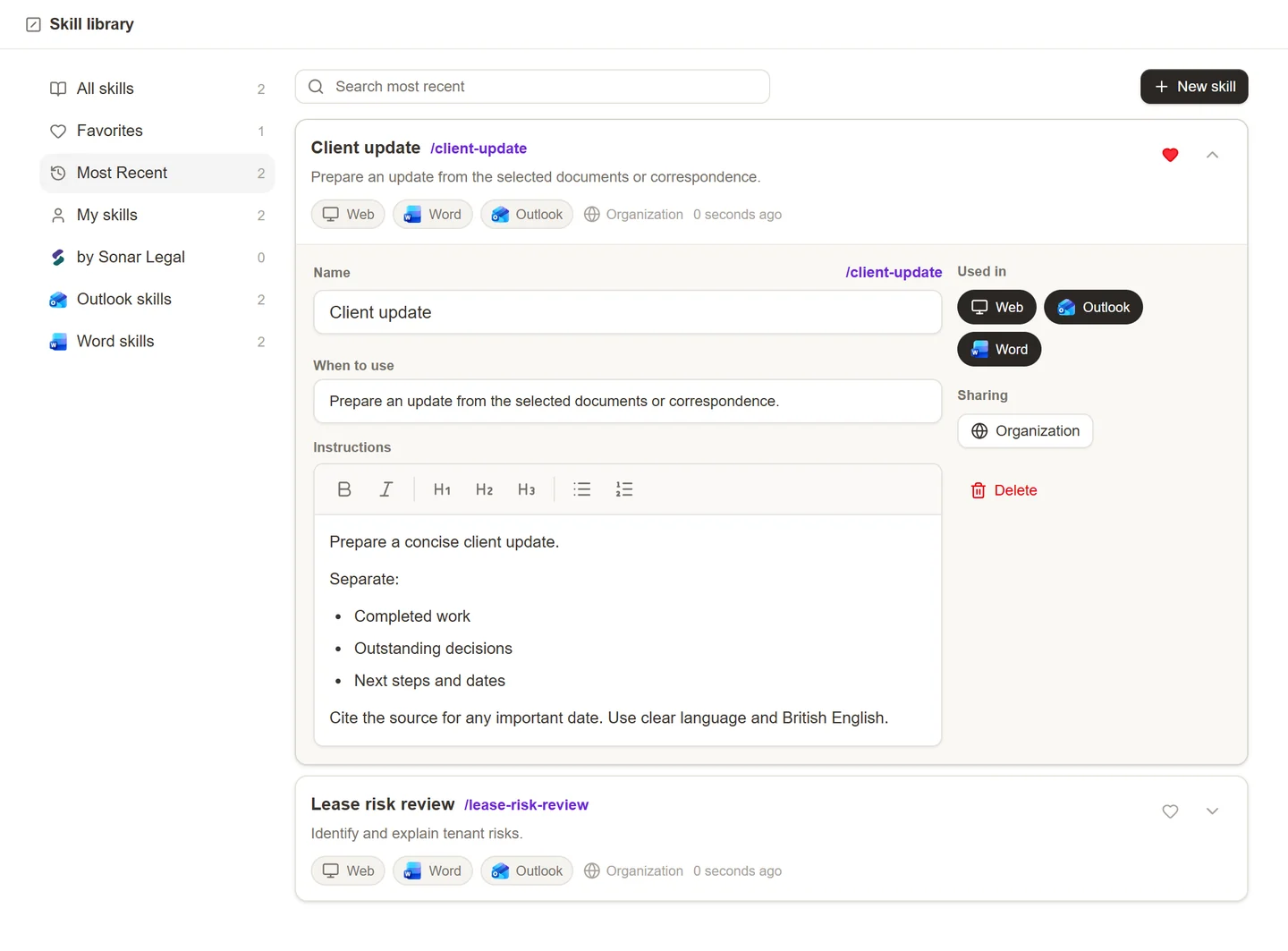
Create a skill
- Open Skill library in the Sonar Legal App.
- Select New skill and give it a name.
- In When to use, explain when someone should use it.
- Write the Instructions: what to examine, the perspective to take, and the result you want.
- Under Used in, select Web, Word, and/or Outlook as appropriate.
- Wait for the saved status before leaving the editor.
For example: “Prepare a short client update from the selected correspondence. Separate completed work, outstanding decisions, and next steps. Identify dates mentioned in the source.” Keep the instruction specific enough that another colleague can use it without your explanation.
Share a skill
Use Sharing in the skill editor to choose who can use it. Review the available access choices before making a skill available across the organization. A shared skill may contain your firm's preferred approach, so remove client-specific details unless they are appropriate for everyone receiving it.
If you can view a shared skill but cannot edit it, ask its owner to update it or create your own version. Sharing a skill does not by itself share the documents that a colleague needs to run it.
Use a skill across platforms
In the Sonar Legal App, select Skills beside the chat composer or type / to find a skill. In Word and Outlook, use the skill library in the chat or action controls. A skill appears only in the applications selected under Used in and where you have access to it.
Supply the relevant document, selection, email, or workspace before running it. The same instructions can be reused across platforms, but the available material depends on where you are working.
Update an existing skill
Open it in Skill library, edit the name, description, instructions, or application choices, and check that the changes have saved. If it is shared, colleagues will use the updated instructions the next time they select it.
Use a playbook when you need an organized set of contract-review positions, fallbacks, and questions. Use a skill for reusable instructions in a conversation or action.