Table reminders
Use reminders to bring important dates back to your attention: an agreement's expiry, a renewal deadline, or the date by which notice must be given.
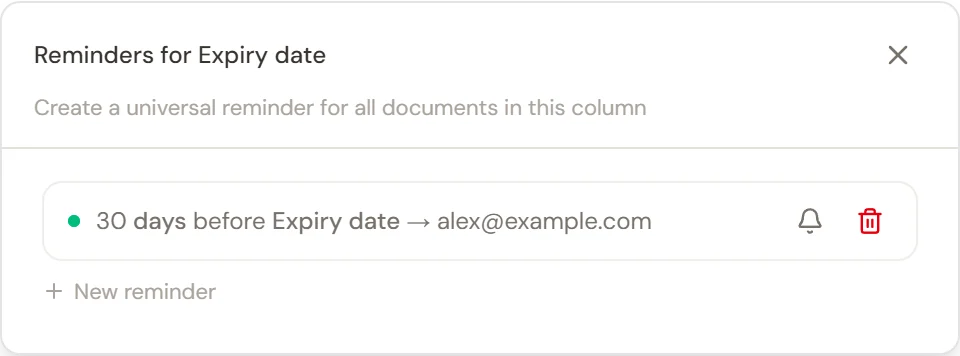
Start with a date column
Your table needs a column whose format is Date. Create one for the event you want to monitor, then check the extracted dates against the documents. For a notice deadline, extract the actual notice deadline rather than the contract's expiry date unless you intend to calculate the interval yourself.
A reminder depends on a usable date in the relevant row. Check blank, uncertain, or failed date cells before expecting a reminder for those documents.
Set a reminder for a column
- Open the date column's menu and select Reminders.
- Choose the interval, such as 30 days before the relevant date.
- Choose the date the interval is measured from. The available choices include date columns in the table.
- Add the email recipients.
- Save the reminder and check that it is enabled.
A column reminder covers the documents to which that date rule applies. You can create separate reminders for different intervals, such as an early review reminder and a later notice reminder.
Review reminders for one document
Open the row's three-dot menu and choose Edit Data to see its reminders alongside its notes, chronology, and versions. Use this view when a particular agreement needs additional attention or a document-specific reminder.
Change or stop a reminder
Return to Reminders to adjust the timing or recipients. Use the enable/disable control to pause it, or delete the reminder when it is no longer needed. Read the control's description: disabling a column reminder affects the documents covered by that reminder.
Example: an upcoming lease renewal
Create a Date column for the notice deadline. Verify the date for each lease. Set a reminder far enough in advance for the responsible lawyer to obtain instructions and prepare the notice, and add the colleagues who should receive it.
Reminders help you act on the dates in the table. Keep using your firm's usual diary and deadline checks for legal time limits.