Format
Use Format to bring an agreement into a consistent stylesheet without formatting every paragraph by hand.
Choose the stylesheet
- Open Format in the Word add-in.
- Choose a stylesheet for the document type and language.
- For a bilingual document, choose the appropriate bilingual option.
Selecting a stylesheet starts preparing the paragraph-style suggestions.
The Sonar Legal Standard stylesheet suits many documents. If the language needs a localized stylesheet, choose that option instead. For an unsupported language, contact the Sonar Legal team.
Review the suggested styles
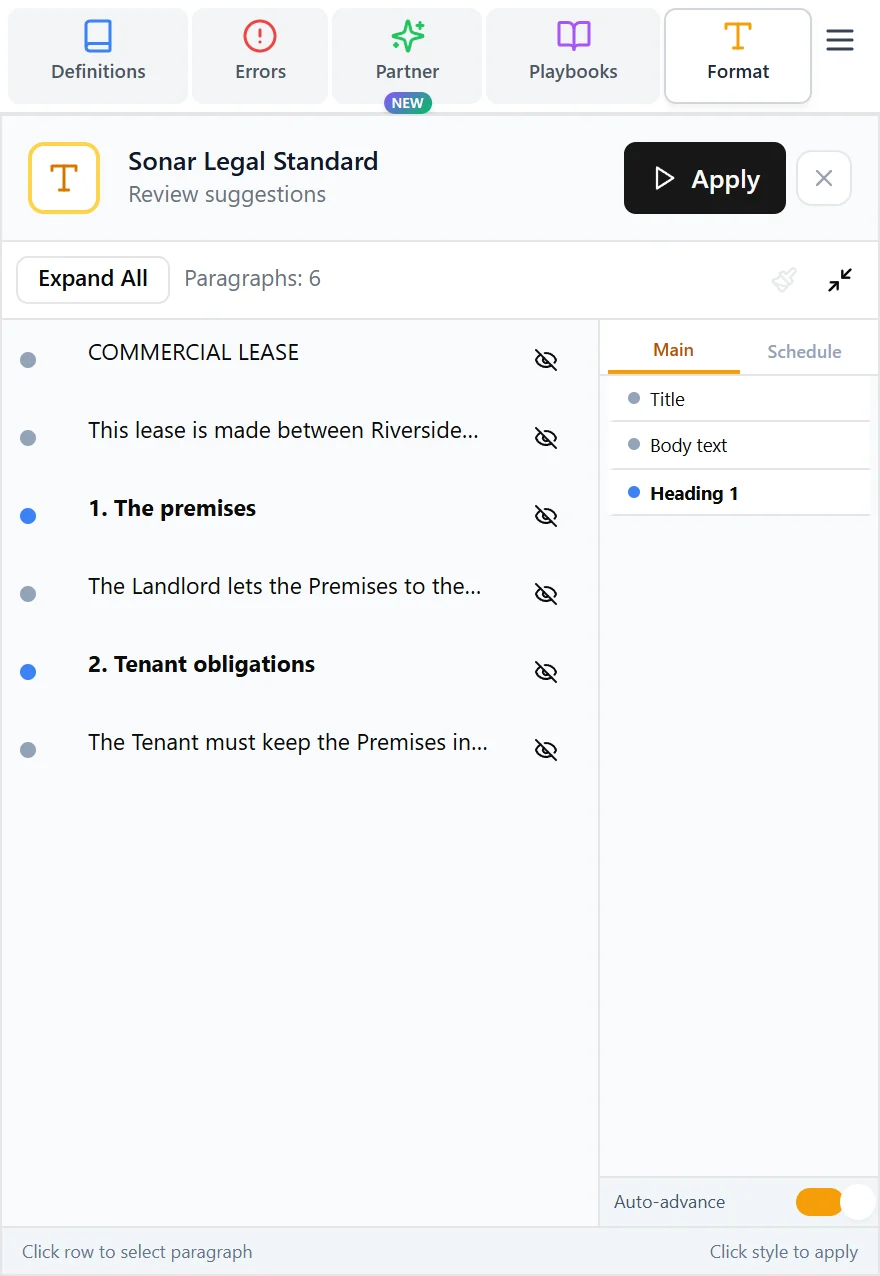
Select a paragraph in the review list, then choose the correct style from the panel on the right. Expand a paragraph to read more of its wording, or use Expand All to open the whole list. Use the paragraph controls to find the wording in Word or leave a paragraph out of formatting. The Style Cheatsheet explains the available paragraph styles.
Apply the formatting
Once the suggested styles are ready, select Apply. Review the result in Word, including headings, numbering, lists, and any bilingual layout. Adjust a paragraph's style and apply it again where needed.
Keep using your firm's preferred stylesheet and conventions. If those need to be configured for the organization, see House styles.