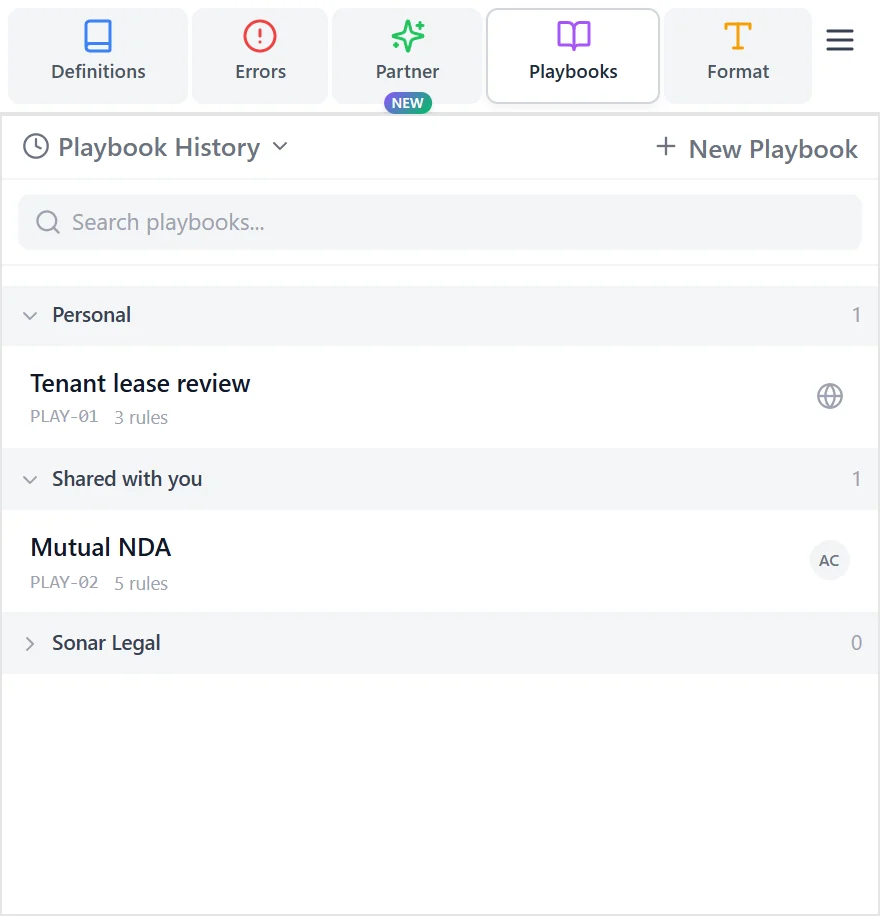
Playbooks

Redline your incoming agreements based on your playbooks, or utilize one of the built-in Sonar Playbooks.

Playbook Results

Custom Playbooks

Sonar Legal lets your team create, store, and use fully customizable playbooks to review incoming agreements based on your organization's standards.

Create Playbook

There are four ways to create a playbook in Sonar Legal.

Create Playbook

  • From Precedent: Upload a “gold standard” agreement, or an existing playbook you have crafted outside Sonar Legal. This can be a precedent contract you like, or a simple document that already lists your positions in plain language, or bullet points. Add guidance such as which side you represent, what is the purpose behind building this playbook, or which provisions to prioritize.
  • From Current Document: Use the Word document you currently have open as the source. This is useful when the currently open document already reflects your acceptable positions (or contains a playbook-like checklist). Add guidance to flag any deal-specific concessions that should not become "generalized."
  • From Instructions: Provide instructions only. Here, you should be more detailed in your instructions, since there are no reference files. Describe the contract type, the side you represent, the provisions that should be prioritized, and ideally your preferred positions and fallbacks.
  • From Scratch: Skip AI assistance, and build the playbook manually based on the structure provided by Sonar Legal (sections, rules, and examples).

Drafting & Clarifications

After you submit your reference files and/or instructions, Sonar Legal drafts an initial playbook.

Drafting is interactive: if anything is ambiguous, Sonar Legal pauses and asks focused clarification questions rather than guessing. This keeps the playbook aligned with your intent and reduces rework later.

Questions

Playbook Format

The generated playbook follows this structure:

  • Description: A short 3-4 sentence summary of the playbook purpose.
  • Sections: Major topics (for example, Payment Terms, Liability, Confidentiality, Termination).
  • Rules: Specific checks under each section.
  • Examples: Preferred wording so Sonar Legal can apply the rule consistently. Add multiple examples when a rule has acceptable variants (for example, fallback #1 and fallback #2).

Custom Playbooks

Improve Suggested Rules

If you have used Sonar Legal to generate the first playbook draft for you, it's now time for you to check it and make the necessary edits. You can directly edit any playbook rule by directly clicking on it. Sonar Legal also offers an Improve button for AI-powered edit.

Improve Playbook

Rule Writing: Avoid Overcorrections

To reduce unnecessary redlines, write rules as a decision ladder. Start with the ideal position (preserve it). Then define acceptable fallbacks (accept them, optionally with bounded edits). Finally, define what is unacceptable and how to revise it.

Example 1: Invoicing & Payments - Payment Timing

Assume you represent the payor and your minimum acceptable term is net 30 (or better). There are multiple ways to express this in a playbook rule.

Bad: Too open-ended

Rule (Payment Timing): Require payment terms of at least net 30 days.

Why this may fail: The rule does not explicitely tell Sonar Legal how to approach editing. The "require payment terms of at least net 30 days" can be interpreted in multiple ways. For instance, that every agreement should literally require "payment within at least 30 days." This means the LLM may rewrite more favorable terms (such as 45 days) to "at least 30 days", or even change 30 days to "at least 30 days."

Better: Fixes weaker language

Rule (Payment Timing): Require at least net 30 days. Upgrade payment terms shorter than net 30.

Why this is better: It explicitly directs edits for unfavorable payment terms, but it still does not explicitly protect longer payment terms. The combination of "require" and "at least net 30 days" could still trigger unwanted edits, for example "30 days" could still become "at least 30 days."

Best: Preserves better, upgrades worse

Rule (Payment Timing): If payment is due more than 30 days after receipt of a proper invoice, do not change it. If payment is due exactly 30 days, leave it unchanged. If payment is due in fewer than 30 days, revise to net 30 days from receipt of proper invoice.

Why this is strongest: it defines acceptance logic, so the LLM does not “correct” a baseline or better-than-baseline term down to the baseline.

Example 2: Confidentiality - Standard of Care

Assume you represent the discloser and want the recipient to protect confidential information using at least a reasonable standard of care (and to preserve stronger standards when the draft already includes them). Once again, many different ways to put it into a rule.

Bad: Ambiguous instruction

Rule (Standard of Care): Require the Recipient to use at least a "reasonable standard of care."

Why this may fail: It does not tell the LLM what to do when the draft already contains a higher standard, so stronger language may be flattened.

Better: Fixes weaker language

Rule (Standard of Care): Require the Recipient to use at least a "reasonable standard of care." Identify and upgrade language that sets a lower threshold.

Why this is better: it directs upward edits, but still does not expressly preserve or even define these "higher standards."

Best: Preserves stronger language, upgrades weaker language

Rule (Standard of Care): Require at least a reasonable standard of care. If the clause already uses a higher standard (for example, highest degree of care or industry best practices), do not change it. If the clause uses a lower or undefined standard, revise to at least a reasonable standard of care.

Why this is strongest: it gives the LLM a clear decision ladder (preserve superior, keep baseline, upgrade inferior) and reduces overcorrection.

Collaboration

Playbooks can be kept private or shared with members of your organization. Shared playbooks are visible to all members, but only the playbook owner can edit them.

Quick Check

Utilize our "Quick Check" feature to conduct a high-level, neutral review of your contract. These playbooks are designed to identify common issues such as incomplete clauses, ambiguous language, and inconsistent legal terminology.

Quick Check

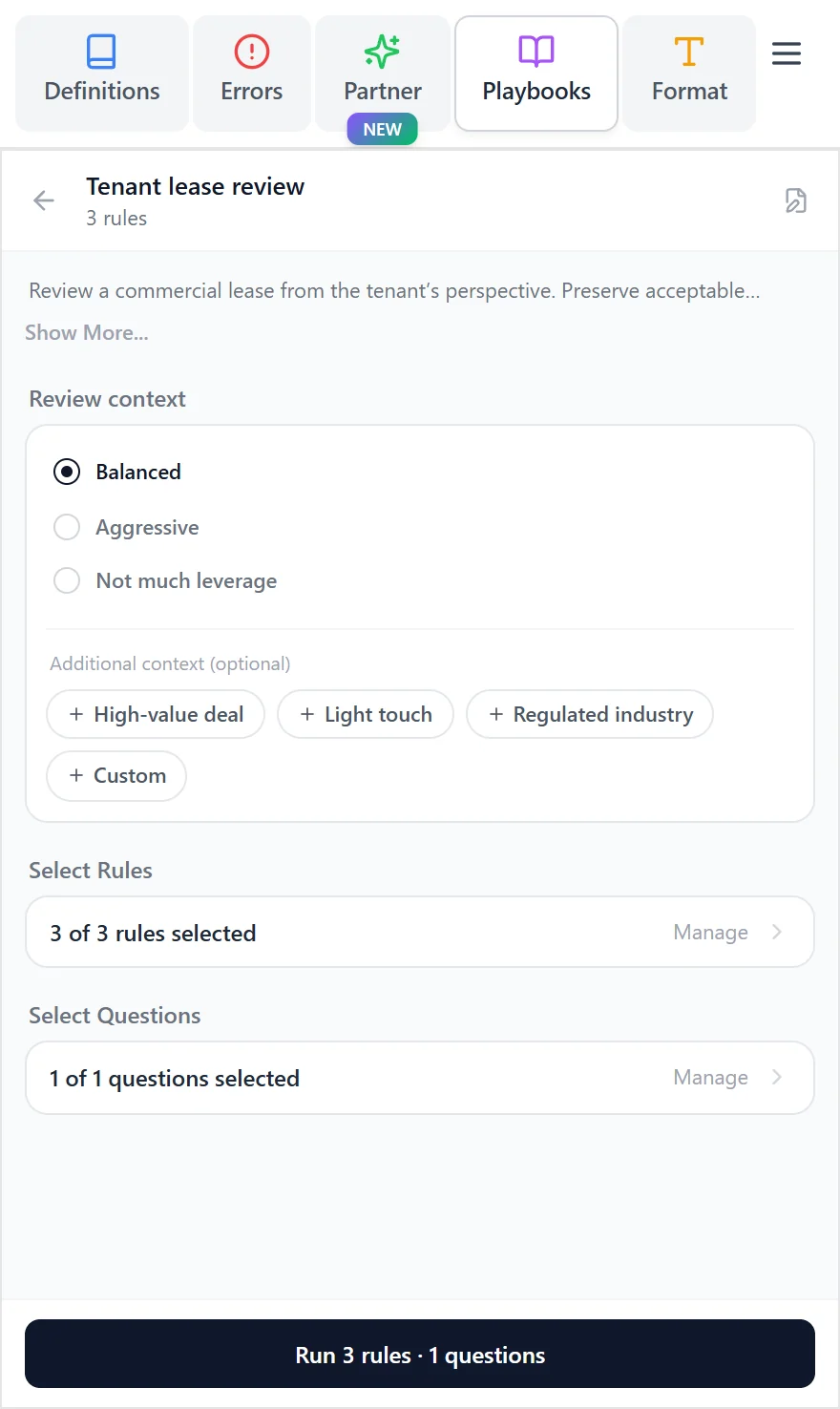
These specialized playbooks are tailored to favor one of the parties in the agreement. When you click Start, you will be redirected to the Playbook Rules page, where you can review all the rules included in the playbook. You can then choose which rules to include or exclude in this specific review, allowing you to customize the evaluation to your needs.

Pro-side Playbooks

Results Display

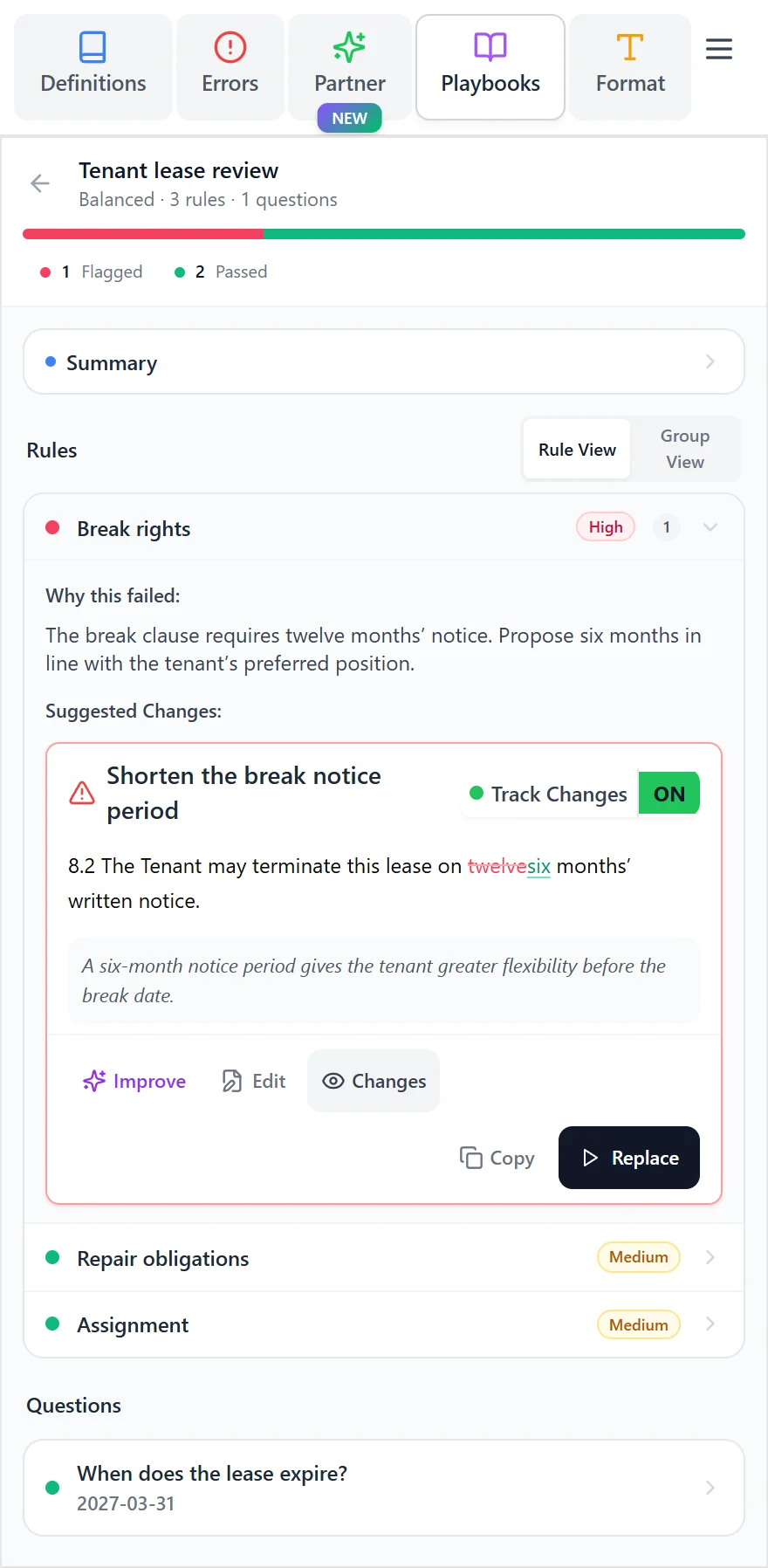
After the playbook review is complete, Sonar Legal displays findings rule-by-rule. Each section (and the rules inside it) is evaluated, so you can see why something passed or failed with citations and proposed edits. Each suggestion includes:

  • pass/fail outcome,
  • supporting citation from the document, and
  • proposed revision text.

Playbook Results Suggestion

You can navigate suggestions using the arrow buttons, or switch to List View to review all suggestions in sequence. Each suggestion is categorized by severity (high, medium, or low), so you can prioritize what to address first. To apply a suggestion directly to your document, click Replace.

You also have the option to decide whether the replacement is applied as a tracked change or as a normal, untracked update. Use the toggle at the top of the results panel to choose your preferred option. If you opt for a tracked change, you will be prompted to enter the name of the person making the change. Choose your name for internal documents or your organization's name for external communications, based on your policy.

Results Panel

When track changes is enabled, you have the option to insert a comment along with your redrafted clause. By default, Sonar Legal provides two comment templates: one optimized for client, or internal communications, and one targeted for the counterparty. You can customize these comments to match your specific requirements and communication style.