Templates
Templates let you codify your preferred email structures, tone, and language so that Sonar drafts in your style—not a generic one. Rather than starting from scratch each time, you can build a personal or team library of templates that reflect how your practice actually communicates: your sign-offs, your preferred formality, your standard clause language, your firm's voice.
Once saved, templates are available as context across Chat, Draft, and Redraft—meaning Sonar will use your template as a structural and stylistic reference when generating output, not just as a static starting point.
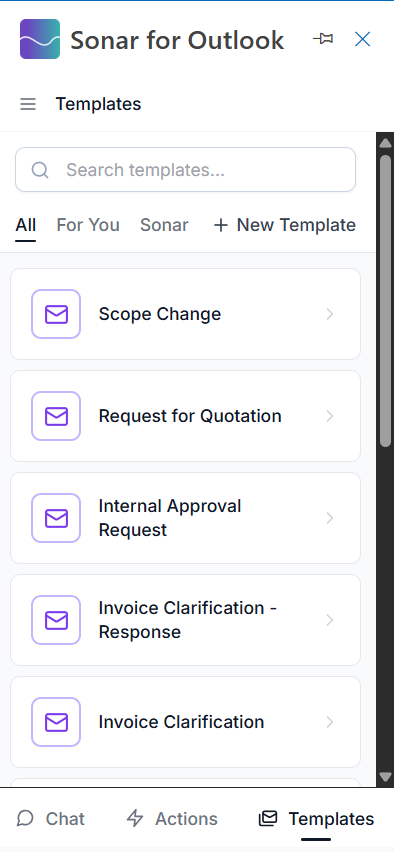
Using a Template
Browse your saved templates and select the one that fits your current task. Sonar will use it as the orientating reference for its output—matching its structure, tone, and formatting when drafting or redrafting your email.

You can use templates as context in the following features:
- Chat — Reference a template when prompting Sonar to draft or revise, and the output will follow the template's structure and style
- Draft — Select a template before generating a draft and Sonar will model its output on it
- Redraft — Use a template to ensure revisions stay consistent with your preferred format, even when rewriting selected text
Creating Your Own Templates
The real power of Templates comes from building your own. Any email structure you find yourself reusing—whether it is a client update format, a standard negotiation opener, a closing checklist, or a tone you have refined over years of practice—can be saved as a template and immediately put to work.
To create a template, compose the structure or example email you want to save, then save it to your template library with a descriptive name. From that point on, Sonar can use it as a stylistic and structural guide whenever you invoke it.
What makes a good template:
- A representative example of a full email, not just a subject line or fragment
- Language and tone that reflects how you or your firm actually writes
- Enough structure that Sonar can infer your preferences—section order, formality level, preferred phrasing patterns
Tip: Templates are especially valuable for recurring correspondence types: matter update emails, engagement letters, negotiation responses, or any situation where consistency across your team matters.
For Teams and Junior Professionals
Templates are a natural fit for firms that want to standardize communication quality across seniority levels. Senior practitioners can create templates that encode their drafting standards, and junior team members can use them as both a learning tool and a quality baseline—ensuring every outgoing email reflects the firm's voice, even on a first draft.